

Make Business Knowledge Easier to Find, Trust, and Reuse
Every organization depends on knowledge: approved procedures, project decisions, technical specifications, customer records, and the experience employees accumulate over time. Yet much of that information is scattered across shared drives, email attachments, personal folders, and disconnected applications.
LogicalDOC helps teams bring document-based knowledge into a secure, searchable environment. Instead of repeatedly recreating information, employees can locate the right document, understand its history, collaborate on updates, and reuse approved content. This makes a document management system a practical foundation for organizational knowledge management.
What Is Knowledge Management Software?
Knowledge management software helps an organization capture, organize, maintain, discover, and share the information people need to do their work. A knowledge management system (KMS) may include knowledge bases, document repositories, search tools, collaboration spaces, and processes for keeping information accurate. The goal is not simply to store more content; it is to make useful knowledge available when a decision or task requires it.
Some knowledge is explicit: written procedures, contracts, policies, reports, and manuals. Other knowledge is tacit: experience and practical judgment that employees have not yet documented. A sound knowledge management approach helps people turn repeatable expertise into accessible resources, while keeping the original context and ownership clear.
LogicalDOC focuses on the document-centered part of this process. It organizes files and their metadata, makes content searchable, manages versions and permissions, and supports controlled review and approval. It is not a replacement for every wiki, discussion forum, or customer-facing knowledge base; it provides the governed document foundation those activities often depend on.
Knowledge Management vs. Document Management
| Aspect | Knowledge management | Document management with LogicalDOC |
|---|---|---|
| Primary goal | Make organizational expertise accessible and reusable | Control and retrieve document-based information |
| Typical content | Lessons learned, guidance, answers, and shared practices | Policies, procedures, contracts, technical files, and records |
| Core activities | Capture, share, apply, and improve knowledge | Classify, search, version, secure, review, and approve documents |
| How they work together | Reliable documents become reusable knowledge assets when people can find, understand, and maintain them. | |
Why Business Knowledge Gets Lost
Even experienced teams lose time when important information is hard to locate or its reliability is uncertain. These challenges affect small teams as well as larger, distributed organizations.
Scattered files
Employees search multiple drives and inboxes, sometimes finding different copies of the same document.
Outdated answers
Without clear revision history, people may rely on obsolete procedures or unapproved information.
Knowledge silos
Useful expertise remains with individual team members instead of becoming shared organizational knowledge.
Slow onboarding
New colleagues repeatedly ask for instructions because reference materials are difficult to discover.
These problems are not solved by adding another folder alone. Organizations need consistent classification, clear ownership, controlled access, and an easy way to find answers. When knowledge assets are managed deliberately, teams can spend less time hunting for files and more time serving customers, completing projects, and improving processes.
Knowledge Management Features Built on Document Control
LogicalDOC brings structure to document-based knowledge. Its capabilities help people preserve useful information and make it available to authorized colleagues across departments.
Central Repository and Metadata
Store policies, manuals, specifications, and project files in organized folders. Add metadata and consistent categories so knowledge is not dependent on a single employee's naming habits. A central repository gives teams a common reference point while preserving document context.
Search and Information Discovery
Find existing information through indexed content and document properties instead of browsing folder after folder. Search helps employees locate answers in technical documents, procedures, and other business records. Advanced search capabilities depend on the selected edition and configuration.
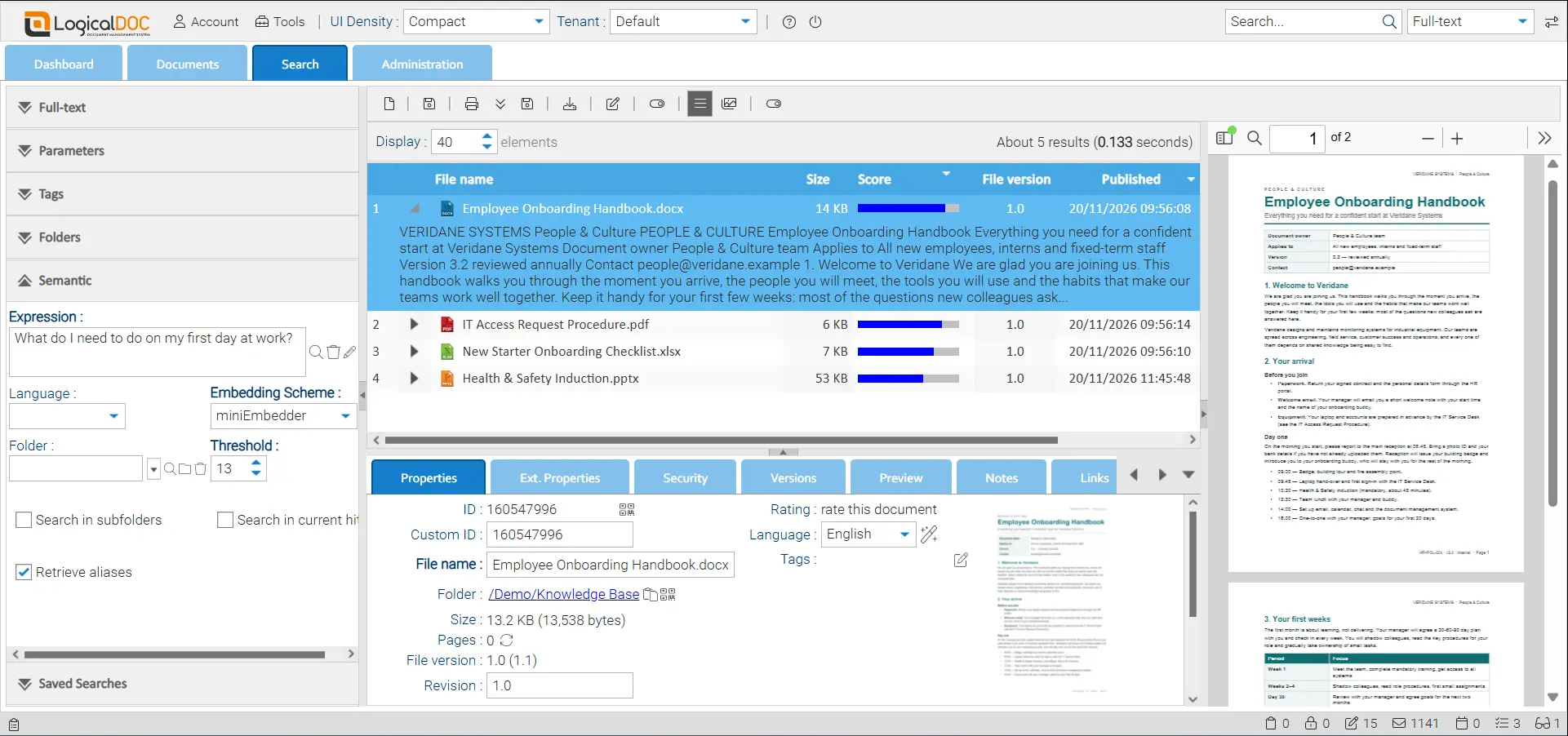
Real-world example: “What do I need to do on my first day at work?”
Semantic search can surface relevant onboarding handbooks, IT access procedures, and induction materials without relying on exact keyword matches.
Version and Revision Control
Maintain a history of document changes and identify the current revision. Users can understand how a document evolved and, where permitted, recover an earlier version. This is especially useful for procedures and reference materials that change as business requirements develop.
Permissions and Document History
Apply access controls to protect sensitive knowledge while allowing authorized teams to collaborate. LogicalDOC can record document events such as downloads, edits, and other actions; administrators can configure which events are included in the history. This supports traceability without implying that every possible event is always recorded.
Document Review and Approval Workflows
Route documents through review and approval steps so employees can distinguish drafts from content that has completed a defined process. Workflow automation helps teams maintain controlled procedures and publish more reliable reference material. Workflow availability depends on the LogicalDOC edition.
Annotations and Collaboration
Capture feedback around documents through annotations and comments. A reviewer can point out missing details or explain why a change matters, helping convert practical experience into more useful documentation. Collaborative review reduces the need to exchange uncontrolled attachments.
Deployment and editions: Feature availability may vary by LogicalDOC edition and deployment model. Compare editions before selecting a configuration.
The Knowledge Management Lifecycle
Useful knowledge needs to remain current. A simple lifecycle connects everyday document activity with long-term knowledge reuse.
Capture
Bring documents, procedures, and reference files into a shared repository.
Organize
Use folders, metadata, and permissions to establish context and ownership.
Find
Retrieve relevant content through search and structured navigation.
Share
Give authorized colleagues access to documents they can use in their work.
Improve
Review feedback, revise content, and maintain a trustworthy history.
For example, a quality manager uploads a revised operating procedure, assigns descriptive metadata, and sends it for approval. Once approved, colleagues can locate the current version and consult its history. When the process changes again, the document is updated rather than recreated from scratch. Over time, this practice builds a more dependable collection of organizational knowledge.
Knowledge Management Use Cases Across the Business
A knowledge management solution becomes valuable when it supports real work. Here are practical ways teams can use LogicalDOC as their document knowledge foundation.
Employee Onboarding and Training
Human resources teams can organize employee handbooks, internal policies, and training documents in one controlled location. New hires find the information relevant to their roles, while document owners can update materials as procedures change. This reduces dependence on informal explanations and supports more consistent onboarding, without promising to eliminate training entirely.
Customer Service and Support Teams
A support team needs accurate technical notes, product instructions, and troubleshooting procedures to respond consistently. LogicalDOC can store and retrieve these internal knowledge assets so customer-facing employees can find answers more quickly. It does not itself replace a customer support ticketing platform or public help center.
Technical and Project Documentation
Engineering and project teams work with drawings, specifications, meeting records, and revisions. A shared repository helps them locate the latest approved documents, preserve earlier versions, and reuse proven templates in future projects. The result is less duplicated work and clearer continuity when project responsibilities change.
Quality Procedures and Internal Policies
Quality and compliance teams can manage controlled procedures, instructions, and supporting records. Permissions, version history, and approval workflows help maintain a clear document lifecycle. Organizations remain responsible for configuring controls and validating their processes against any applicable regulatory requirements.
What Changes When Knowledge Is Easier to Reuse?
Less searching
Employees spend less effort locating existing information.
More consistency
Teams work from controlled documents and clearer revisions.
Better continuity
Critical documents remain available when people change roles.
Faster reuse
Approved knowledge can support recurring tasks and projects.
How to Build a Sustainable Knowledge Management Practice
Software works best when it supports clear information habits. A successful rollout begins with the knowledge people actually need and a manageable set of responsibilities.
Start with High-Value Documents
Identify the materials employees request most often: operating procedures, frequently used templates, technical guides, customer documentation, and current policies. Bring these into a controlled repository before attempting to migrate every historical file. Agree on document owners and review dates so information does not become obsolete immediately after publication.
Choose a small set of metadata fields that reflect how employees search: document type, department, project, product, or status. Consistent descriptions help people find answers even when they do not know the original filename. Avoid complicated classification rules that teams cannot maintain.
Make Knowledge Maintenance Part of Work
Decide who can create, review, approve, and retire each category of document. When a procedure changes, update the existing controlled document rather than circulating another attachment. Encourage reviewers to record meaningful comments and explanations, particularly when decisions depend on experience that has not yet been documented.
Review whether employees can find the material they need and which searches repeatedly fail. Feedback from new hires and customer service colleagues often reveals gaps that document owners overlook. Knowledge management improves through small, regular corrections—not a one-time upload.
Practical starting point: Select one department, organize its most frequently used documents, assign content owners, and test retrieval with real employee questions. Expand the approach once the classification and review process are working.
Knowledge Management Software FAQ
- What is the difference between a knowledge management system and a document management system?
A knowledge management system supports the broader process of capturing and sharing organizational expertise. A document management system focuses on storing, organizing, securing, searching, and controlling documents. LogicalDOC supports knowledge management by making document-based knowledge easier to govern and reuse.
- Can LogicalDOC be used as a knowledge management platform?
Yes, for document-centered knowledge management. Teams can maintain policies, manuals, technical information, and other knowledge assets with metadata, search, permissions, and version history. Organizations needing a public-facing knowledge base or discussion community may also use complementary tools.
- How does knowledge management help small teams?
Small teams often rely on a few people who know where everything is stored. A shared, searchable document repository reduces that dependency, helps new team members find procedures, and provides a more consistent source for recurring tasks.
- How can support teams benefit from managed knowledge?
Support employees can search internal troubleshooting guides, product documentation, and approved procedures instead of asking colleagues for the same information repeatedly. This can improve consistency and shorten the time needed to locate relevant guidance.
- Does LogicalDOC support document approval and revision history?
LogicalDOC provides document versioning and history capabilities, and workflow features are available in applicable editions. These tools help organizations review changes, identify document revisions, and manage approval steps according to their processes.
- Is there a free plan for knowledge management?
LogicalDOC offers a Community Edition alongside commercial editions. Their capabilities and support options differ. Review the current edition comparison to determine which version meets your knowledge management requirements.
Turn Document Collections into Usable Business Knowledge
See how LogicalDOC can help your organization centralize information, improve document discovery, and maintain controlled knowledge across teams.
